"Step into a realm of enchanting robotics with Akno, the Arduino Mega 2560-powered wonder. Immerse yourself in the captivating fusion of technology and cuteness as Akno, your very own charming robot companion, comes to life. Designed with love and ingenuity, Akno showcases the magic of DIY robotics, inviting you to explore its delightful interactions and endearing personality. Embrace the future with Akno and experience innovation through the lens of adorable companionship.”
"Delve into the world of innovative DIY robotics with the mesmerizing Akno project. Crafted using the Arduino Mega 2560 platform, this project is a testament to creativity and technical prowess. Akno, an embodiment of cuteness and ingenuity, brings together art and engineering in a seamless fusion. Explore the meticulous process of designing, assembling, and programming Akno, and witness how simple components can be transformed into a captivating robotic companion. From its expressive interactions to its charming aesthetics, the Akno project exemplifies the endless possibilities when imagination meets technology. Join us in unraveling the journey of creating a lovable robot that not only sparks joy but also inspires the tinkerer in all of us.”
Components
the components used are:
Motherboard/brain:- Arduino Mega 2560
voice recognition Module
St7920 LCD display : 128*64
L293D motor drivers
Analog Push buttons
Microphone for giving commands
LED
About the project
AKNO is a smart, kind, and cute robot made with love and wires.
By Moksh Gupta
Akno is a smart robot with voice recognition and facial expressions. It reacts with voice commands with 25 voice command and it has 15 different facial expression on 128*64 lcd display via SPI, and the main AKNO'S brain is the Arduino MEGA 2560 Powered by two 18650 3.7v 2000mAh batteries. With two common Anode RGB LEDs one in the front and one in the back of the robot, with 3 push buttons for a varies functionalities. /**/
===========================================
/Features/ Akno support's more than 250 voice command (25 of them is already in use at that version)
15 different facial expression with smoth animation (happy, sad, angry, upset, normal, cute, suspicious, iam, youmademe, wonder, downeye, righteye, lefteye, upeye, blink) plus two RGB LEDs effects.
6 different moving pattern (right, left, forward, backward, spinning, doproblems)
Akno support's game mode (PongGame) you can play with him.
You can add more features if you're familiar with c/c++. /**/
===========================================
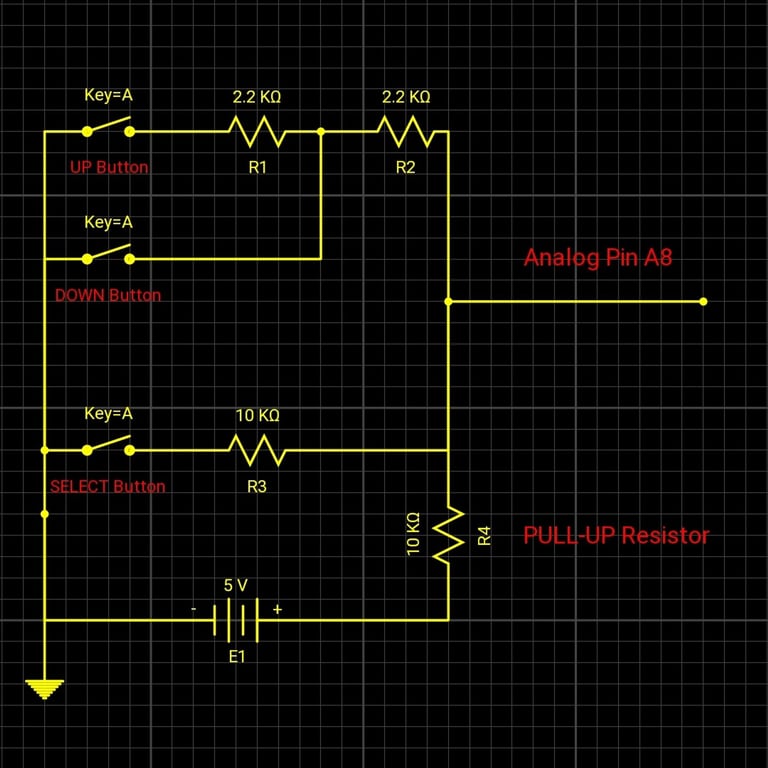
/* NOTICE CAREFULLY*/ Please notice all buttons connected to analog pin with resistors, so you should consider that if you want to change the buttons into digital pin.
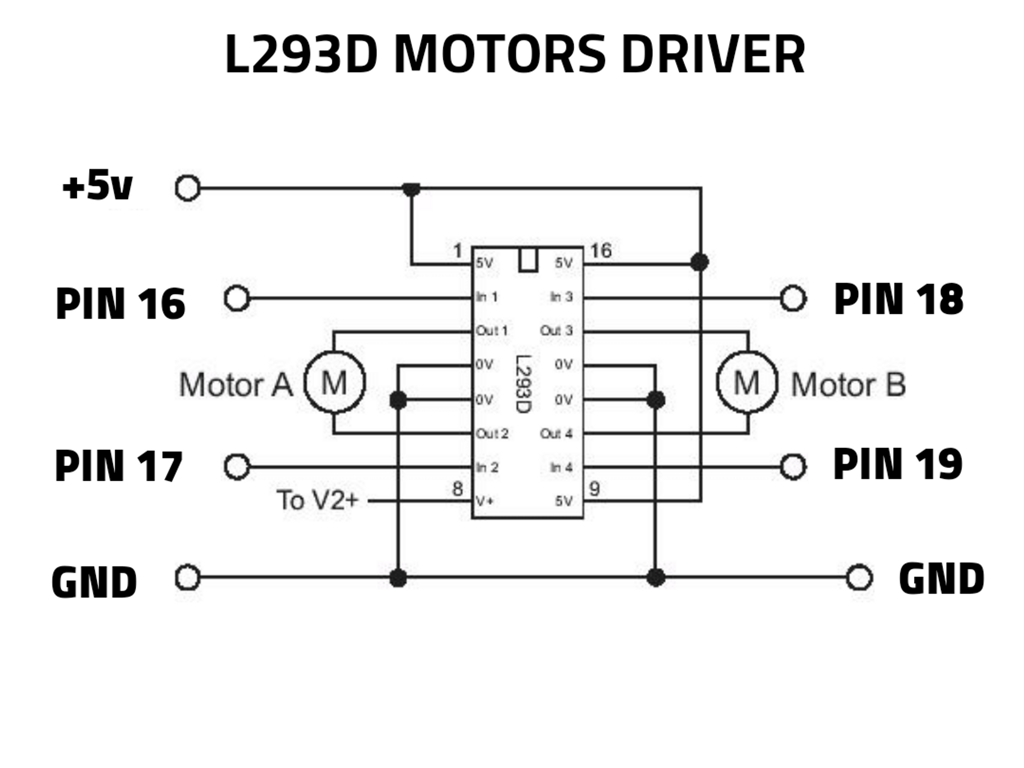
All enable pins of the motor driver which (l293d) ic at high state, or you can just attach it to 5v.
I used common Anode RGB LEDs at this version of AKNO, so if you want to use common Cathode LEDs you should make changes at : expressions.h/(line:250&line:262)/(LED1&LED2) functions by Just deactivate the marked three lines. /**/
===========================================
This is the the worst code I've ever written, but it works :)
Circuit Diagrams
1️⃣
ANALOG PUSH BUTTON
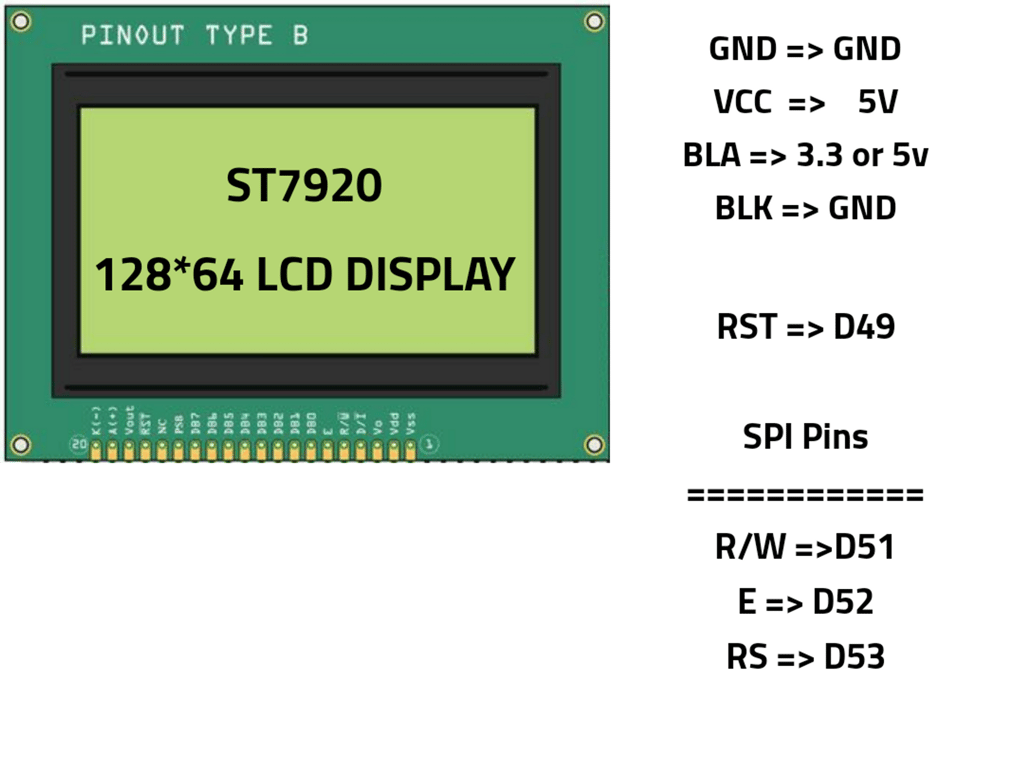
2️⃣
ST7920 LCD DISPLAY
3️⃣
L293D MOTOR DRIVERS
4️⃣
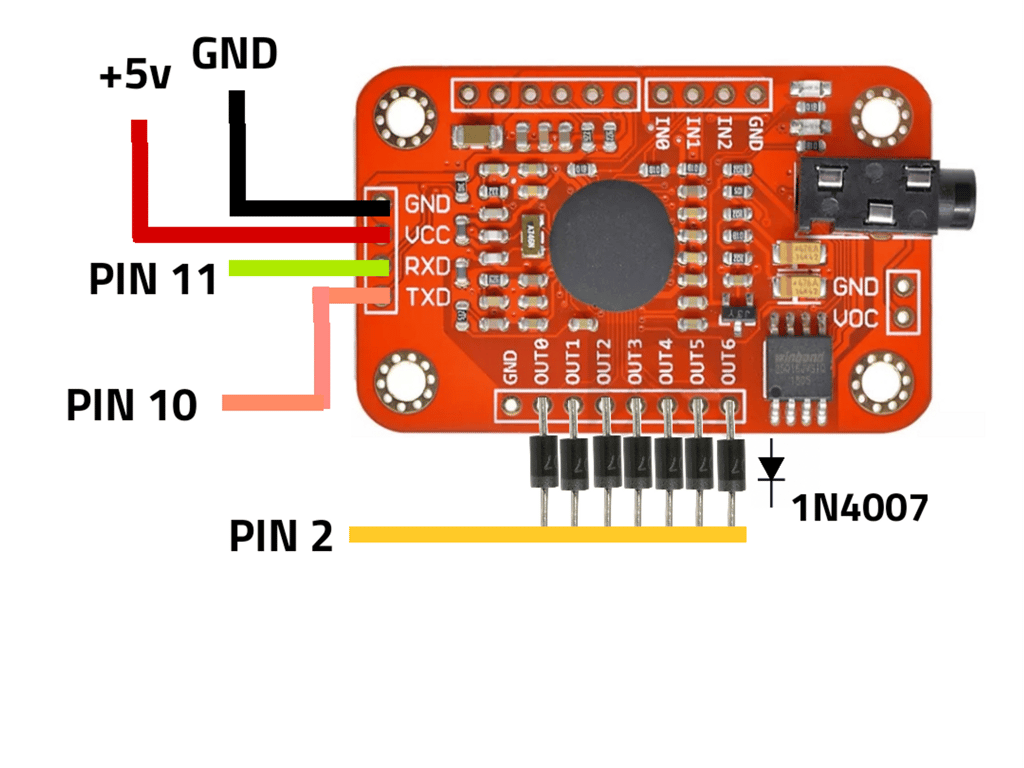
VOICE RECOG MODULE
As it is given in each circuit diagram, to what Arduino pin the module pin is to be connected
It would be easier for you to assemble the Akno bot, connect a Microphone to the voice recognition module.
Akno.ino
#include "VoiceRecognitionV3.h"
#include "definitions.h"
#include "PongGame.h"
#include "voice_commands.h"
#include "moves.h"
#include "reactions.h"

// Voice Recognition pins connection
VR myvr(10, 11); // Rx => 11, Tx => 10
//      10  11

uint8_t records[7];
uint8_t buf[64];


void ponggame();


void setup() {
    Serial.begin(115200);

    myvr.begin(9600);
    myvr.setIOMode(3);
    attachInterrupt(digitalPinToInterrupt(interruptPin), listening, RISING);

    defState();

    load_main_commands();

    u8g2.begin();
    u8g2.clearBuffer();
    LED1(0, 155, 255);
    LED2(100, 255, 0);
    close();
    delay(600); // 600
    normal();
    delay(200); // 200
    close();
    delay(150); // 150
    normal();
    delay(400); // 400
    hanging();
    skip = 1;

}


void loop() {
    LED1(0, 155, 255);
    LED2(100, 255, 0);
    CurrentTime1 = millis();
    CurrentTime2 = millis();
    CurrentTime3 = millis();
    u8g2.clearBuffer();
    stop();
    skip = 1;


    recognizing = myvr.recognize(buf, 50);

// when voice active is true reset IO pins of the voice recognition module to make a custom pulse
    if(VoiceActive == true) {
        myvr.resetIO(0);
        VoiceActive = false;    }
// random actions every 4 seconds
    if((CurrentTime3-PrevTime3) > 5000) {
        hanging();
        PrevTime3=CurrentTime3;
    }


    if(counter == 150) {  counter = 180;  }
// upset when long time passes
    if(counter > 150) {
      upset();
        counter -= 1;
        if(counter == 150) {  counter = 0;  }
    }
  // blink when not upset (normal mode)
    else {   blink();
             q = -15;
             counter++;
        Serial.println(analogRead(A8));   }
 // Enter voice training mode if (select&up)or(select&down) button is pressed at the se time
  if(comp(buttonvalue[3])||comp(buttonvalue[4])||voicetraining_command){
        train_voice();
      voicetraining_command=false;
         close();
    delay(600); // 600
    normal();
    delay(200); // 200
    close();
    delay(150); // 150
    normal();
    delay(400); // 400
    hanging();
        }

     handshake();// check if hand is shaked

// check if there's voice command active
    if(recognizing > 0) {
// skip variable is to make all delay =0 when voice command is comming, and let the delay normal when voice command is not active
        skip = 1;
        switch(buf[1]) {

            case heyakno:
            heyakno_reaction();
            if(!firstlist) {
                myvr.clear();
                load_main_commands();
            }
            break;

                 case youknowwhat:
            youknowwhat_reaction();
            if(!seclist) {
                myvr.clear();
                load_chatting_commands();
            }
            break;

            case gotoo:
           goto_reaction();

            if(!thirdlist) {
                myvr.clear();
                load_moving_commands();
            }
            break;

          case youarestupid:
        youarestupid_reaction();
            break;

            case partytime:
         partytime_reaction();
            break;


            case goright:
         goright_reaction();
            break;

            case goleft:
         goleft_reaction();
            break;

            case gobackward:
         gobackward_reaction();
            break;

            case nicewheels:
       nicewheels_reaction();
            break;

            case letsplay:
            letsplay_reaction();
            break;

            case doproblems:
          doproblems_reaction();
            break;

            case whoareyou:
         whoareyou_reaction();
            break;

               case iloveyou:
         iloveyou_reaction();
            break;

               case ihateyou:
         ihateyou_reaction();
            break;

              case imsorry:
         imsorry_reaction();
            break;

             case crazy:
         crazy_reaction();
            break;

                  case goforward:
         goforward_reaction();
            break;

                 case spining:
         spining_reaction();
            break;

                 case expressions:
         expressions_reaction();
            break;


                  case battreylevel:
         battreylevel_reaction();
            break;

              case colortest:
         colortest_reaction();
            break;

               case voicetraining:
         voicetraining_reaction();
            break;


              case testmotors:
         testmotors_reaction();
            break;


              case testbuttons:
         testbuttons_reaction();
            break;


        case showsetting:
            showsettings_reaction();
             if(!fourthlist) {
                myvr.clear();
                load_settings_commands();
                  }
            break;

        default: break;

        }


    }
}


// interrupting when voice command is comming
void listening() {
    skip = 0;// make skip 0 to make delay(x*skip) =0 too
    VoiceActive = true;
}

// load first list. max 7 command active at the same time.
void load_main_commands() {
    myvr.load(uint8_t(heyakno)); // hey acno
    myvr.load(uint8_t(youknowwhat)); // go
    myvr.load(uint8_t(gotoo)); // right
    myvr.load(uint8_t(letsplay)); // turn
    myvr.load(uint8_t(whoareyou)); // dance
    myvr.load(uint8_t(showsetting)); // left
    myvr.load(uint8_t(iloveyou)); // back

    firstlist = true;
    seclist = false;
    thirdlist = false;
    fourthlist = false;

}

// load the second list. max 7 command active at the same time.
void load_chatting_commands() {
    myvr.load(uint8_t(heyakno));
    myvr.load(uint8_t(ihateyou));
    myvr.load(uint8_t(youarestupid));
    myvr.load(uint8_t(imsorry));
    myvr.load(uint8_t(nicewheels));
    myvr.load(uint8_t(crazy));
    myvr.load(uint8_t(partytime));

    firstlist = false;
    seclist = true;
    thirdlist = false;
    fourthlist = false;

}

void load_moving_commands() {
    myvr.load(uint8_t(heyakno));
    myvr.load(uint8_t(goright));
    myvr.load(uint8_t(goleft));
    myvr.load(uint8_t(goforward));
    myvr.load(uint8_t(gobackward));
    myvr.load(uint8_t(spining));
    myvr.load(uint8_t(doproblems));

    firstlist = false;
    seclist = false;
    thirdlist = true;
    fourthlist = false;

}

void load_settings_commands() {
    myvr.load(uint8_t(heyakno));
    myvr.load(uint8_t(expressions));
    myvr.load(uint8_t(battreylevel));
    myvr.load(uint8_t(colortest));
    myvr.load(uint8_t(voicetraining));
    myvr.load(uint8_t(testmotors));
    myvr.load(uint8_t(testbuttons));

    firstlist = false;
    seclist = false;
    thirdlist = false;
    fourthlist = true;

}


void train_voice() {
  int visibility =1;
  bool blink_ok = false;

// Categorie commands selecting menu
   while(1){

    u8g2.setDrawColor(1);
    CurrentTime1 = millis();
   u8g2.clearBuffer();
   u8g2.setFont(u8g2_font_helvB08_tf);
  u8g2.drawFrame(0,0,128,64);
  u8g2.drawStr(15, 12, "Select the Categorie");
  u8g2.drawHLine(5, 17, 118);
  u8g2.drawStr(5, 37, categories[categorie_num]);
  u8g2.drawButtonUTF8(110, 59, U8G2_BTN_INV, 0,  2,  2, "OK");
  u8g2.sendBuffer();

    if(comp(buttonvalue[0])){
          categorie_num++;
            delay(200);  }
     if(comp(buttonvalue[1])){
            categorie_num--;
            delay(200);   }

    if(comp(buttonvalue[2])&&((CurrentTime1-PrevTime1) > 1100)&&(categorie_num<4)){
         PrevTime1=CurrentTime1;

// Command selecting menu
    while(1)  {
     CurrentTime1 = millis();
    u8g2.clearBuffer();
  u8g2.drawFrame(0,0,128,64);
  u8g2.setFont(u8g2_font_helvB08_tf);
  u8g2.drawStr(16, 12, categories[categorie_num] );
  u8g2.drawHLine(5, 16, 118);
  u8g2.drawStr(23, 28, "Select Command");
  u8g2.drawButtonUTF8(110, 59, U8G2_BTN_INV, 0,  2,  2, "OK" );
  u8g2.drawStr(5, 45, commands[command_num]);
 u8g2.drawStr(110, 45, numbers[command_num]);
  u8g2.sendBuffer();

        if(comp(buttonvalue[2])&&((CurrentTime1-PrevTime1) > 800)){
       PrevTime1=CurrentTime1;

// training instruction menu
     while(1) {
     CurrentTime1 = millis();
    u8g2.clearBuffer();
  u8g2.drawFrame(0,0,128,64);
  u8g2.setFont(u8g2_font_helvB08_tf);
  u8g2.drawStr(5, 10, "Start speak when the" );
  u8g2.drawStr(5, 21, "light turned red and");
  u8g2.drawStr(5, 33, "stop when it doesn't");
       u8g2.setDrawColor(visibility);
  u8g2.drawButtonUTF8(110, 59, U8G2_BTN_INV, 0,  2,  2, "OK" );
        u8g2.setDrawColor(1);
  u8g2.drawHLine(5, 37, 118);
  u8g2.drawStr(5, 48, commands[command_num]);
 u8g2.drawStr(105, 48, numbers[command_num]);
  u8g2.sendBuffer();

// exit
if(comp(buttonvalue[2])&&((CurrentTime1-PrevTime1) > 400)&&blink_ok){  PrevTime1=CurrentTime1;
              blink_ok=false;
              break;           }

// blinking OK
      if((CurrentTime1-PrevTime1)>700){
    visibility<1?visibility++:visibility--;
          PrevTime1=CurrentTime1;
            blink_ok = true;  }

     }

  // start listening and train
   train_state = myvr.train(command_num, buf);
             PrevTime1=CurrentTime1;
}

 // trained successed message
        while(train_state==3){
       CurrentTime1 = millis();
      u8g2.clearBuffer();
  u8g2.drawFrame(0,0,128,64);
  u8g2.setFont(u8g2_font_helvB08_tf);
  u8g2.drawStr(28, 12, "Training Done!" );
  u8g2.drawStr(5, 32,commands[command_num]);
  u8g2.drawStr(110, 32,numbers[command_num]);
  u8g2.drawButtonUTF8(110, 59, U8G2_BTN_INV, 0,  2,  2, "OK" );
  u8g2.sendBuffer();

// exit
if(comp(buttonvalue[2])&&((CurrentTime1-PrevTime1) > 800)){ train_state=0;
        PrevTime1=CurrentTime1;   }

  }
// end of train success message

     if(comp(buttonvalue[0])){
           command_num++;
            delay(250);   }
     if(comp(buttonvalue[1])){
           command_num--;
            delay(250);   }

      if((comp(buttonvalue[3])||comp(buttonvalue[4]))&&((CurrentTime1-PrevTime1) > 1000)){ PrevTime1=CurrentTime1;
        break;        }

    if(command_num>uprange[categorie_num]){
         command_num=downrange[categorie_num];
         }
    if(command_num<downrange[categorie_num]){
         command_num=uprange[categorie_num];   }
 }//end while


            delay(300);

     } // endif
  else if(comp(buttonvalue[2])&&(categorie_num==4)&&((CurrentTime1-PrevTime1) > 1000)){

     while(1){

          CurrentTime1 = millis();

        info();

        if((comp(buttonvalue[3])||comp(buttonvalue[4]))&&((CurrentTime1-PrevTime1) > 1000)){
        PrevTime1=CurrentTime1;
        break;     }
     }
  }

       if((comp(buttonvalue[3])||comp(buttonvalue[4]))&&((CurrentTime1-PrevTime1) > 1000)){
        PrevTime1=CurrentTime1;
        myvr.clear();
        load_main_commands();
        break;        }


  if(categorie_num>categorie_item-1){
         categorie_num=0;        }
  if(categorie_num<0) {
       categorie_num=categorie_item-1;   }


     }
 }


void info(){

    u8g2.clearBuffer();
  u8g2.drawFrame(0,0,128,64);
  u8g2.setFont(u8g2_font_helvB08_tf);
  u8g2.drawStr(42, 12, "Akno Bot" );
  u8g2.drawHLine(5, 14, 118);
  u8g2.drawButtonUTF8(109, 59, U8G2_BTN_INV, 0,  2,  2, "==>" );


    switch(next_page){
        case 0:
  u8g2.drawStr(3, 26, "Software Version 1.1");
  u8g2.drawStr(3, 38, "By Moksh Gupta ");
  u8g2.drawStr(3, 50, "Vist my github page");
  u8g2.sendBuffer();
    break;

        case 1:
 u8g2.drawStr(3, 26,"for checking updates :");
  u8g2.drawStr(2, 40, "github/moksh5936");
  u8g2.drawStr(3, 53, "/Akno");
  u8g2.sendBuffer();
            break;
       }

 if(comp(buttonvalue[2])){
    next_page>0?next_page=0:next_page++;
        delay(400);       }
}
There are some libraries to be imported in Arduino ide those are in the project file those exist in the form of header file( .h )
I'm a student passionate about blogging, robotics and hacking. I'm driven by a desire to share my knowledge and experiences with others, and I'm always looking for new ways to engage with my readers.
Cloud computing refers to the delivery of on-demand computing resources over the internet. It allows individuals and businesses to access and utilize a wide range of services, including storage, servers, databases, software, and applications, without the need for on-premises infrastructure. Cloud computing provides flexibility, scalability, and cost-efficiency, enabling users to scale their resources up or down based on their needs and pay only for what they use. With cloud computing, data and applications are stored and processed in remote data centers, providing seamless access from any location with an internet connection. It has revolutionized the way organizations manage and deploy their IT resources, empowering innovation and digital transformation across various industries.

 Made with Bullet